

Getting started with Register Account on 3Patti Crown is simple and secure. By following the official process, players can enjoy real-money gaming with peace of mind. Ensuring you have a valid mobile number, stable internet, and a linked payment wallet will make registration seamless. Completing the steps correctly allows you to unlock exciting rewards, safeguard your progress, and access all premium features offered by 3Patti Crown.
Pre-Registration Requirements
Before you start the registration process, make sure you have the following ready to avoid any interruptions:
- A Valid Pakistani Mobile Number: Required for SMS (OTP) verification.
- A Secure Internet Connection: Use stable 4G/5G or Wi-Fi to ensure the OTP arrives quickly.
- Sufficient Device Storage: Ensure you have at least 150MB of free space on your Android device.
- EasyPaisa or JazzCash App: Having these installed will make your future deposits and withdrawals much faster.
How to Download and Install the App
Since 3 Patti Crown Official is a real-money gaming app, it must be downloaded directly from our official website rather than the Play Store.
- Visit the Official Site: Go to 3PattiCrownOfficial.com.
- Download the APK: Click on the “Download” button.
- Enable Unknown Sources: Go to your phone Settings > Security and allow “Install from Unknown Sources.”
- Install: Open the downloaded APK file and tap Install.
Also Read complete information for Download and Install the App
How to Register Account on 3Patti Crown?
To register your account or bind your email to 3 Patti Crown, follow these simple steps to secure your gaming profile and unlock all features. Complete the registration process to ensure your progress is saved and you can access exclusive rewards and gameplay options.
Step 1: Open the 3 Patti Crown app on your device and wait for the main screen to load with all available options.
Step 2: Select the ‘Play as Guest‘ option displayed on the main screen to begin your gaming experience without immediate registration requirements.
Step 3: The app will automatically register a temporary account for you and assign a unique player ID for identification purposes.
Step 4: Tap on your profile icon located in the top left corner of the screen to access your account settings and edit your personal details.

Step 5: Navigate to the user tab in the game lobby and click the ‘Bound‘ option to start the account binding process.
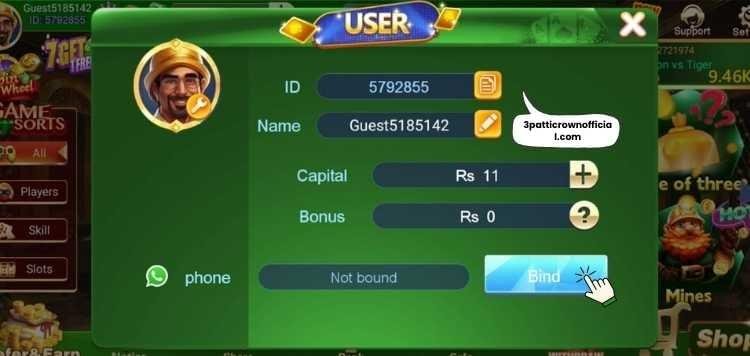
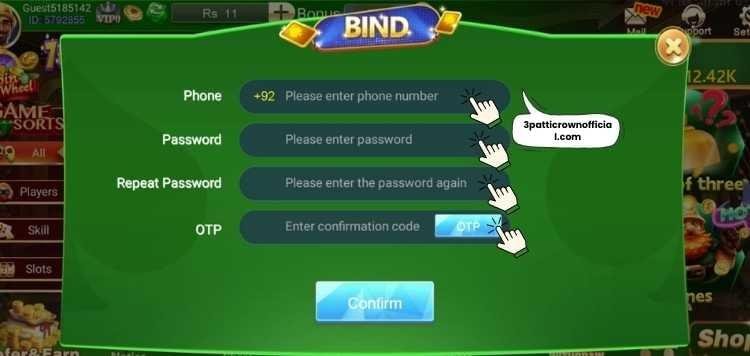
Step 6: Enter your mobile number in the designated field along with any other required information requested by the system.
Step 7: Complete the captcha verification challenge and create a strong, secure password using a combination of letters, numbers, and special symbols.
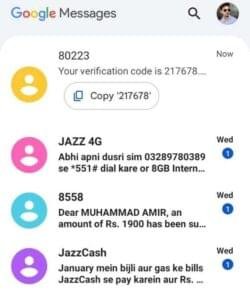
Step 8: Check your message inbox for the verification code sent to your mobile number and enter it in the provided field to confirm.
Step 9: Click the ‘Confirm‘ button to finalize your registration and unlock full access to all available games and premium features.
Setting Up Your Profile for Success
After the initial registration, we highly recommend completing these steps to enhance your experience:
Biding Your Account
If you joined as a “Guest,” make sure to click on your profile icon and select “Bind Phone.” This ensures that if you lose your phone or delete the app, your money and progress remain safe.
Linking Your Payment Wallet
Go to the “Withdraw” section and link your EasyPaisa or JazzCash account. Ensure the “Account Name” matches the name on your CNIC to avoid withdrawal delays.
Claiming Your Welcome Bonus
Check your in-game mailbox. New players on 3 Patti Crown are often eligible for a sign-up reward (ranging from 5 PKR to 111 PKR) just for completing registration.
Important Troubleshooting
If you are struggling to receive the verification code, try these solutions:
- Check Signal Strength: Move to an area with better network reception.
- Clear App Cache: Go to Phone Settings > Apps > 3 Patti Crown > Clear Cache, then try again.
- Wait for the Countdown: Do not spam the “Get OTP” button. Wait for the timer to hit zero before requesting a new one.
- Check Blocked SMS: Ensure your phone isn’t automatically marking the OTP SMS as “Spam.”
Security Best Practices for New Users
To keep your 3 Patti Crown account and winnings safe, follow these rules:
- Never Share Your OTP: No official staff member will ever ask for your OTP or Password.
- One Device, One Account: Avoid creating multiple accounts on the same phone, as our anti-fraud system may ban both accounts.
- Avoid Personal Information: Never use your name, date of birth, or phone number as your password. These are the first things a hacker will try.
- The “Mix & Match” Rule: Use a combination of Uppercase letters (A-Z), lowercase letters (a-z), Numbers (0-9), and Special symbols (@, #, $, %).
- Example: Instead of pakistan123, use P@k1st@n#786.
- Length Matters: A secure password should be at least 8 to 12 characters long. Longer passwords are significantly harder for automated “brute-force” software to crack.
- Unique for 3 Patti Crown: Do not use the same password you use for your Facebook, Email, or Bank account. If one is compromised, the others remain safe.
- Use a Passphrase: Instead of a single word, think of a short sentence only you know and use the first letter of each word.
- Change It Periodically: Update your password every 3–6 months to stay ahead of any security risks.
Common Registration Problems and Solutions
If you encounter issues while setting up your 3 Patti Crown Official account, don’t worry—most problems are easily fixed with these simple troubleshooting steps.
OTP (One-Time Password) Not Received
- Problem: You clicked “Get OTP,” but no SMS arrived on your registered mobile number within the expected timeframe.
- Solution: Wait at least 2 minutes before requesting the code again, and check if your phone is in Airplane Mode or “Do Not Disturb” mode. Ensure the 3 Patti Crown app has “SMS Permissions” enabled in your phone settings, and try switching from Wi-Fi to Mobile Data to refresh your connection.
Mobile Number Already Registered” Error
- Problem: You try to sign up for a new account, but the app says your number is already in use by another profile.
- Solution: You likely created an account in the past, so instead of registering again, go to the Login screen and use the “Forgot Password” option to recover it via OTP.
IP Limit Exceeded / Device Limit Error
- Problem: An error message appears saying you have created too many accounts from the same device or network connection.
- Solution: 3 Patti Crown Official allows only one account per device for security, so if you’re on shared Wi-Fi, switch to Mobile Data for a fresh IP address. Avoid using VPNs during registration as they can trigger security restrictions and cause account creation failures.
App Crashes or Freezes During Signup
- Problem: The app closes unexpectedly or gets stuck on the loading screen while you’re trying to complete the registration process.
- Solution: Go to Settings > Apps > 3 Patti Crown and tap “Clear Cache” to remove temporary files causing the issue. Ensure you have at least 200MB of free storage space, and check for updates on the official website since outdated versions often cause crashes.
Invalid Verification Code
- Problem: You entered the OTP received via SMS, but the app says the verification code is wrong or has expired.
- Solution: OTPs are time-sensitive and usually expire in 60 seconds, so ensure you’re entering the latest code sent to your phone immediately. If you requested multiple codes, delete the old SMS messages and only use the newest one to avoid confusion.
Guest vs Registered Account
| Feature / Aspect | Guest Mode | Registered Account |
|---|---|---|
| Access | Can play immediately without registration | Full access after registration |
| Player ID | Temporary ID assigned | Permanent unique ID linked to mobile/email |
| Progress Saving | Progress may be lost if app is deleted | Progress saved securely |
| Bonuses & Rewards | Limited or no rewards | Eligible for sign-up bonuses, daily & weekly rewards |
| Deposits & Withdrawals | Not available | Full access via EasyPaisa or JazzCash |
| Security | Low – no account binding | High – protected by OTP and password |
| Account Recovery | Not possible | Possible via mobile/email verification |
| VIP or Premium Features | Restricted | Fully unlocked after registration |
| Device Limit | One device temporary | One account per device officially |
| Recommended For | Quick trial or first-time players | Serious players wanting rewards & security |
Conclusion
Successfully completing Register Account on 3Patti Crown ensures you can enjoy a smooth, secure gaming experience without losing progress or rewards. By linking your mobile number and payment wallet, you protect your account while gaining access to exclusive bonuses. Following security best practices and official instructions keeps your funds safe. Take the time to complete your profile and enjoy all the premium features, tournaments, and real-money games offered by 3Patti Crown.